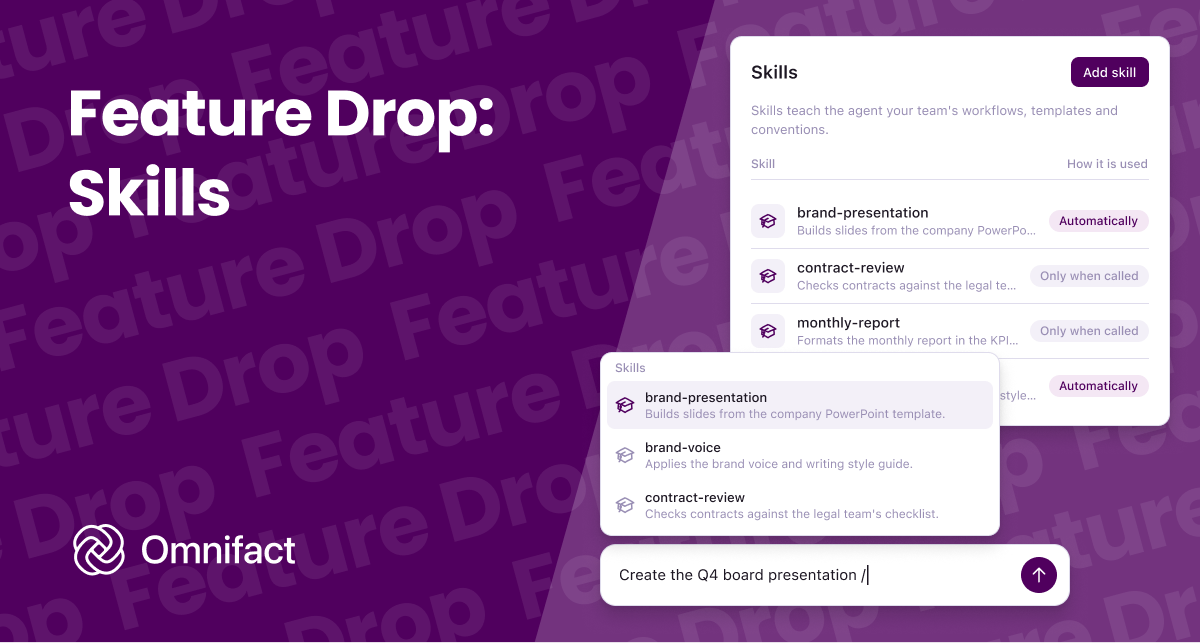
Teach agents your team's workflows, brand templates, and conventions with Skills.
Feature Drop: Skills
Published on November 26th, 2026
Every team has its own way of working, from company slide templates and report formats to contract review checklists. Repeating those instructions or re-uploading template files in chat after chat slows people down, and small inconsistencies still slip through.
Starting today, you can use Skills to teach Omnifact agents your team's workflows, templates, and conventions once, so everyone gets consistent results without having to repeat themselves.
What Your Team Can Do with Skills
A skill is a reusable set of instructions, optionally paired with templates or reference files, that tells an agent how your team handles a specific task:
- On-brand documents and slides: Upload your company's PowerPoint, Word, or Excel templates so document creation builds directly from your corporate layouts, styles, and formulas instead of starting from a blank file.
- Consistent reviews and reports: Turn a legal contract checklist, a brand style guide, or a monthly reporting format into a repeatable workflow the whole team shares.
- Guided tool routines: Show agents how your team combines live records from MCP servers with internal knowledge from Spaces and Connected Sources.
Automatic or On Demand in Chat
For each skill, administrators choose whether agents pick it up on their own or wait until someone asks for it:
- Automatically: The agent uses the skill whenever a request matches its description, such as applying your slide template as soon as someone asks for a presentation.
- Only when called: The skill stays tucked away until a team member calls it, which works well for specialized routines like a quarterly report or an RFP review.
Anyone on the team can also call a skill on demand by typing / in the Chat Input or picking Skills from the + menu. Selected skills appear right in your message as /skill-name, and you can combine several skills in a single prompt.

Easy Setup, Editing, and Clear Privacy
Administrators manage everything under Team Settings → Skills. You can write a skill directly in Omnifact, or upload a .zip folder containing instructions, templates, and reference files. If your team already has individual skills built for tools like Claude Code or Codex, you can upload them without changes.
Once a skill is in place, you can maintain it right on its Files tab without exporting and re-uploading a .zip every time something changes. Edit SKILL.md or any text file in the browser, organize folders, and add, replace, rename, or remove files directly. You can also preview PDFs, Word, Excel, and PowerPoint files (including templates), images, and formatted Markdown right on the page. Every edit stays separate as unpublished changes while you work, so active chats keep using the current version until you click Publish (or Save and publish for a quick text fix).
As in every chat on Omnifact, your documents and prompts remain protected by our Privacy Filter, which uses rule-based and AI-powered detection to pseudonymize PII within Omnifact's infrastructure before reaching any external model. Skill instructions themselves are shared across your workspace and are not masked by the Privacy Filter, so keep personal data and credentials out of skills.
Get Started with Skills
Skills is available today for all organizations.
Administrators find it under Team Settings → Skills. There they can write a new skill or upload a .zip folder, choose whether agents use it automatically or only when called, and publish it for the team. Once a skill is published, everyone on the team can call it with / right from the Chat Input.